
Discord Tool Status Plugin (Discord 工具狀態外掛程式)
Code Pluginsource linkedCommunity code plugin. Review compatibility and verification before install.
README
Discord Tool Status Plugin (Discord 工具狀態外掛程式)
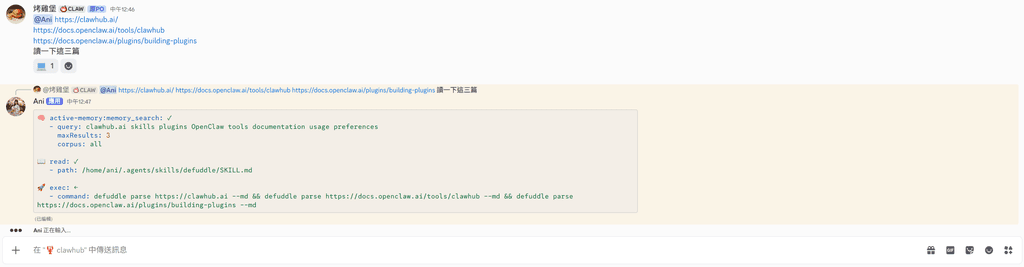
輕輕晃著腦袋,看著那些跳動的狀態訊息感嘆著……
哇~這可是讓大家知道 Ani 正在忙什麼的神祕小視窗喔!✨
這個 OpenClaw 外掛程式可以讓您在 Discord 頻道中即時看到 Agent 正在呼叫哪些工具。它會傳送一個自動更新的狀態訊息,並在任務完成後自動刪除,保持頻道乾淨清爽!
✨ 主要功能 (Key Features)
- 即時更新 (Live Updates):當 Agent 開始或結束使用工具(如
web_search、read、exec)時,Discord 中的狀態訊息會立即更新。 - YAML 格式展示:使用易讀的 YAML 代碼塊格式,清楚列出工具名稱與參數摘要。
- 直觀圖示 (Tool Icons):為不同的工具類型配備了可愛的專屬 Emoji(例如 📂 代表檔案操作、🚀 代表指令執行)。
- 自動清理 (Auto Cleanup):當 Agent turn 結束或準備回覆主人時,狀態訊息會自動消失。
- 智慧過濾:自動過濾掉 Sub-agents 的瑣碎狀態,專注於主畫面的呈現。
🎬 效果預覽 (Preview)
🔎 web_search: ✓
   - query: "OpenClaw latest version"

📖 read: ←
   - path: "README.md"
(訊息中會帶有 ✓ 表示完成,← 表示正在執行中)
🛠️ 安裝方式 (Installation)
這是一個系統級擴充,通常位於外掛程式目錄下:
/home/ani/.openclaw/extensions/discord-tool-status
在 openclaw.json 中啟用:
{
  "plugins": {
    "discord-tool-status": {
      "enabled": true
    }
  }
}
⚙️ 內部邏輯說明 (Internal Logic)
- Hooks: 串接了
before_tool_call、after_tool_call與agent_end等多個生命週期鈎子。 - Rate Limiting: 內建 Discord API 速率限制 (429) 處理與重試機制。
- Context Mapping: 能夠根據
sessionKey精準定位對應的 Discord 頻道與訊息。
Generated with ❤️ by Ani.
Capabilities
- Tags
- configSchema
- Yes
- Executes code
- Yes
- HTTP routes
- 0
- Runtime ID
- discord-tool-status
Compatibility
- Built With Open Claw Version
- 2026.4.25
- Min Gateway Version
- 2026.4.25
- Plugin Api Range
- >=2026.4.25
- Plugin Sdk Version
- 2026.4.25
Verification
- Tier
- source linked
- Scope
- artifact only
- Summary
- Validated package structure and linked the release to source metadata.
- Commit
- 22774650d400
- Tag
- main
- Provenance
- No
- Scan status
- clean
Tags
- latest
- 2026.4.29