
Mem0 memory backend for OpenClaw — platform or self-hosted open-source
README
@mem0/openclaw-mem0
Long-term memory for OpenClaw agents, powered by Mem0.
Your agent forgets everything between sessions. This plugin fixes that — it stores conversations, extracts what matters, and brings it back when relevant.
By default, the plugin runs in skills mode: the agent controls what to remember (triage), how to recall (recall), and periodic cleanup (dream). Skills mode, autoRecall, and autoCapture are all enabled by default during openclaw mem0 init.
Requirements
Check your OpenClaw version:
openclaw --version
# OpenClaw 2026.4.25 (aa36ee6)
| OpenClaw Version | Plugin Support |
|---|---|
>= 2026.4.25 | Fully supported |
Quick Start
Platform (Mem0 Cloud)
Install and Configure
-
Install the plugin via the OpenClaw CLI:
openclaw plugins install @mem0/openclaw-mem0 -
Get your API key from app.mem0.ai.
-
Select the plugin as your memory backend in
openclaw.json. Either initialize via the CLI:openclaw mem0 init --api-key <your-key> --user-id <your-user-id>Or add the full config to your
openclaw.json:{ "plugins": { "slots": { "memory": "openclaw-mem0" }, "entries": { "openclaw-mem0": { "enabled": true, "config": { "apiKey": "${MEM0_API_KEY}", "userId": "alice", "skills": { "triage": { "enabled": true }, "recall": { "enabled": true, "tokenBudget": 1500, "rerank": true, "keywordSearch": true, "identityAlwaysInclude": true }, "dream": { "enabled": true }, "domain": "companion" } } } } } }
Note: OpenClaw memory plugins load through an exclusive slot, so install alone does not activate the plugin. You must set
plugins.slots.memoryas shown above.
Updating the plugin to get the latest features and fixes:
openclaw plugins update openclaw-mem0
Open-Source (Self-hosted)
No Mem0 key needed. Vectors are stored locally in SQLite at ~/.mem0/vector_store.db — no external database required.
Defaults: text-embedding-3-small (OpenAI) for embeddings, gpt-5-mini (OpenAI) for fact extraction — requires OPENAI_API_KEY. For a fully local setup, use Ollama for both LLM and embeddings.
Interactive Setup (Recommended)
Run the guided 4-step wizard:
openclaw mem0 init --mode open-source
The wizard walks you through:
- LLM provider — OpenAI (
gpt-5-mini), Ollama (llama3.1:8b, local), or Anthropic (claude-sonnet-4-5-20250514) - Embedding provider — OpenAI (
text-embedding-3-small) or Ollama (nomic-embed-text, local) - Vector store — Qdrant (
http://localhost:6333) or PGVector (PostgreSQL) - User ID — your memory namespace identifier
Each step tests connectivity (Ollama, Qdrant, PGVector) before proceeding.
Non-Interactive Setup
For CI/CD, scripts, or agent-driven setup — pass all options as flags:
# Fully local with Ollama + Qdrant
openclaw mem0 init --mode open-source \
  --oss-llm ollama --oss-embedder ollama --oss-vector qdrant

# OpenAI + Qdrant
openclaw mem0 init --mode open-source \
  --oss-llm openai --oss-llm-key <key> \
  --oss-embedder openai --oss-embedder-key <key> \
  --oss-vector qdrant

# Anthropic LLM + OpenAI embeddings + PGVector
openclaw mem0 init --mode open-source \
  --oss-llm anthropic --oss-llm-key <key> \
  --oss-embedder openai --oss-embedder-key <key> \
  --oss-vector pgvector --oss-vector-user postgres --oss-vector-password secret

# JSON output (for LLM agents)
openclaw mem0 init --mode open-source --oss-llm ollama --oss-embedder ollama --oss-vector qdrant --json
All --oss-* flags
| Flag | Description |
|---|---|
--oss-llm <provider> | openai, ollama, or anthropic |
--oss-llm-key <key> | API key for LLM provider |
--oss-llm-model <model> | Override default LLM model |
--oss-llm-url <url> | Base URL (Ollama only) |
--oss-embedder <provider> | openai or ollama |
--oss-embedder-key <key> | API key for embedder |
--oss-embedder-model <model> | Override default embedder model |
--oss-embedder-url <url> | Base URL (Ollama only) |
--oss-vector <provider> | qdrant or pgvector |
--oss-vector-url <url> | Qdrant server URL (default: http://localhost:6333) |
--oss-vector-host <host> | PGVector host |
--oss-vector-port <port> | PGVector port |
--oss-vector-user <user> | PGVector user |
--oss-vector-password <pw> | PGVector password |
--oss-vector-dbname <db> | PGVector database name |
--oss-vector-dims <n> | Override embedding dimensions |
Manual Config
Minimal config — uses OpenAI defaults:
{
  "plugins": {
    "slots": {
      "memory": "openclaw-mem0"
    },
    "entries": {
      "openclaw-mem0": {
        "enabled": true,
        "config": {
          "mode": "open-source",
          "userId": "alice"
        }
      }
    }
  }
}
Customize the embedder, vector store, or LLM via the oss block:
"config": {
  "mode": "open-source",
  "userId": "alice",
  "oss": {
    "embedder": { "provider": "openai", "config": { "model": "text-embedding-3-small" } },
    "vectorStore": { "provider": "qdrant", "config": { "url": "http://localhost:6333" } },
    "llm": { "provider": "openai", "config": { "model": "gpt-5-mini" } }
  }
}
All oss fields are optional. See the Mem0 OSS docs for supported providers.
How It Works
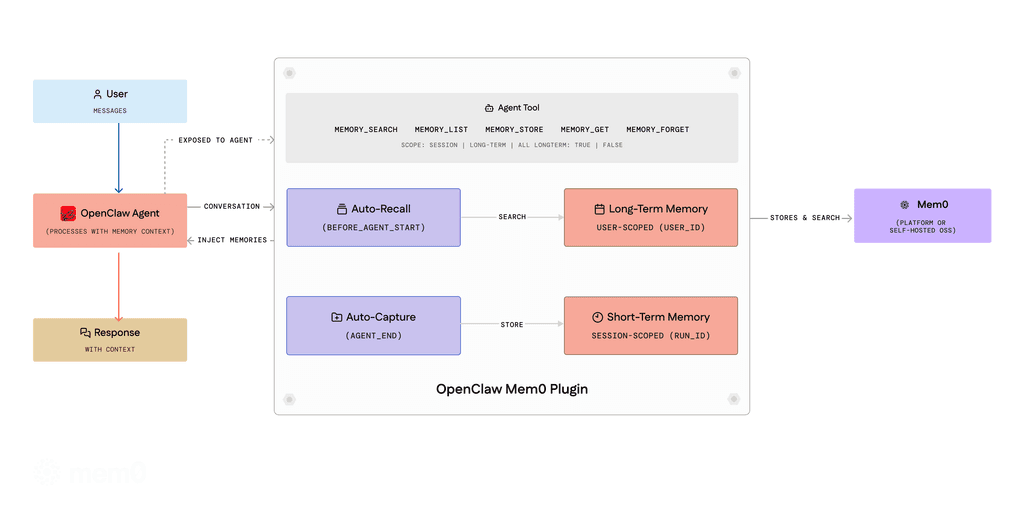
Skills Mode (Default)
Enabled automatically during openclaw mem0 init. The agent controls memory through three skills:
- Triage — Extracts durable facts from conversations using a structured protocol. Categories, importance gates, and domain overlays control what gets stored.
- Recall — Before each turn, rewrites the user message into search queries, retrieves relevant memories with reranking, and injects them into context.
- Dream — Periodic memory consolidation: merges duplicates, resolves conflicts, and prunes stale entries.
When skills mode is active, the skills handle memory operations. autoRecall and autoCapture remain true by default alongside skills mode. The built-in session-memory hook is disabled to avoid conflicts.
Auto-Recall & Auto-Capture
When skills mode is not configured, the plugin uses autoRecall and autoCapture (both enabled by default):
- Auto-Recall — Before the agent responds, the plugin searches Mem0 for relevant memories and injects them into context.
- Auto-Capture — After the agent responds, the conversation is filtered through a noise-removal pipeline and sent to Mem0. New facts get stored, stale ones updated, duplicates merged.
Set autoRecall: false or autoCapture: false to disable individually. The agent can also use memory tools (memory_add, memory_search, etc.) explicitly regardless of these settings.
Memory Scopes
- Session (short-term) — Scoped to the current conversation via
run_id. Recalled alongside long-term memories. - User (long-term) — Persistent across all sessions. Default for
memory_add.
Multi-Agent Isolation
Each agent gets its own memory namespace automatically via session key routing (agent:<name>:<uuid> maps to userId:agent:<name>). Single-agent setups are unaffected.
Agent Tools
Eight tools are registered for agent use:
| Tool | Description |
|---|---|
memory_search | Search by natural language query. Supports scope (session, long-term, all), categories, filters, and agentId. |
memory_add | Store facts. Accepts text or facts array, category, importance, longTerm, metadata. |
memory_get | Retrieve a single memory by ID. |
memory_list | List all memories. Filter by userId, agentId, scope. |
memory_update | Update a memory's text in place. Preserves history. |
memory_delete | Delete by memoryId, query (search-and-delete), or all: true (requires confirm: true). |
memory_event_list | List recent background processing events. Platform mode only. |
memory_event_status | Get status of a specific event by ID. Platform mode only. |
CLI
All commands: openclaw mem0 <command>. All commands support --json for machine-readable output (for LLM agents).
# Memory operations
openclaw mem0 add "User prefers TypeScript over JavaScript"
openclaw mem0 search "what languages does the user know"
openclaw mem0 search "preferences" --scope long-term
openclaw mem0 get <memory_id>
openclaw mem0 list --user-id alice --top-k 20
openclaw mem0 update <memory_id> "Updated preference text"
openclaw mem0 delete <memory_id>
openclaw mem0 delete --all --user-id alice --confirm
openclaw mem0 import memories.json

# Management
openclaw mem0 init                                          # interactive setup
openclaw mem0 init --mode open-source --oss-llm ollama      # non-interactive OSS
openclaw mem0 init --api-key <key> --user-id alice          # non-interactive platform
openclaw mem0 status
openclaw mem0 config show
openclaw mem0 config get api_key
openclaw mem0 config set user_id alice

# Events (platform only)
openclaw mem0 event list
openclaw mem0 event status <event_id>

# Memory consolidation
openclaw mem0 dream
openclaw mem0 dream --dry-run

# JSON output (any command)
openclaw mem0 search "preferences" --json
openclaw mem0 list --json
openclaw mem0 status --json
openclaw mem0 help --json                                   # discover all commands + flags
Configuration Reference
General
| Key | Type | Default | Description |
|---|---|---|---|
mode | "platform" | "open-source" | "platform" | Backend mode |
userId | string | OS username | User identifier. All memories scoped to this value. |
autoRecall | boolean | true | Inject relevant memories before each turn. Ignored when skills is set. |
autoCapture | boolean | true | Extract and store facts after each turn. Ignored when skills is set. |
topK | number | 5 | Max memories returned per recall |
searchThreshold | number | 0.1 | Minimum similarity score (0-1) |
Skills Mode (Recommended)
Enabled by default during openclaw mem0 init. autoRecall and autoCapture are also true by default and work alongside skills mode.
| Key | Type | Default | Description |
|---|---|---|---|
skills.triage.enabled | boolean | true | Enable fact extraction from conversations |
skills.recall.enabled | boolean | true | Enable memory recall before each turn |
skills.recall.tokenBudget | number | 1500 | Max tokens for injected memories |
skills.recall.rerank | boolean | true | Rerank search results for relevance |
skills.recall.keywordSearch | boolean | true | Augment with keyword-based search |
skills.recall.identityAlwaysInclude | boolean | true | Always include identity memories |
skills.dream.enabled | boolean | true | Enable periodic memory consolidation |
skills.domain | string | "companion" | Domain overlay for triage rules |
Platform Mode
| Key | Type | Default | Description |
|---|---|---|---|
apiKey | string | — | Required. Mem0 API key (supports ${MEM0_API_KEY}) |
customInstructions | string | (built-in) | Custom extraction rules |
customCategories | object | (12 defaults) | Category name to description map |
Open-Source Mode
All fields optional. Defaults: text-embedding-3-small embeddings, local SQLite vector store (~/.mem0/vector_store.db), gpt-5-mini LLM.
| Key | Type | Default | Description |
|---|---|---|---|
customPrompt | string | (built-in) | Extraction prompt |
oss.embedder.provider | string | "openai" | Embedding provider |
oss.embedder.config | object | — | Provider config (apiKey, model, baseURL) |
oss.vectorStore.provider | string | "memory" | Vector store provider (see list above) |
oss.vectorStore.config | object | — | Provider config (host, port, collectionName, dbPath) |
oss.llm.provider | string | "openai" | LLM provider |
oss.llm.config | object | — | Provider config (apiKey, model, baseURL) |
oss.historyDbPath | string | — | SQLite path for edit history |
Privacy & Security
Data Flow
| Mode | Where data goes | Credentials needed |
|---|---|---|
| Platform | Conversations sent to api.mem0.ai for memory extraction and retrieval | MEM0_API_KEY |
| Open-Source (OpenAI) | LLM/embedding calls to OpenAI API; vectors stored locally at ~/.mem0/vector_store.db | OPENAI_API_KEY |
| Open-Source (Ollama) | Fully local — LLM, embeddings, and vectors all on your machine | None |
Credential Storage
The plugin stores configuration in ~/.openclaw/openclaw.json. If you use the chat setup flow or openclaw mem0 init, your API key and user ID are written to this file.
To avoid plaintext credentials:
- Use env var references:
"apiKey": "${MEM0_API_KEY}" - Use SecretRef:
"apiKey": {"source": "env", "provider": "default", "id": "MEM0_API_KEY"}
Memory Processing
In skills mode (default after openclaw mem0 init), the agent uses structured protocols (triage, recall, dream) to decide what to store and recall. The built-in session-memory hook is disabled to avoid conflicts.
Without skills, autoCapture and autoRecall are both enabled by default:
autoCapture: sends conversation content to your configured backend after each agent turnautoRecall: queries your memory store before each agent turn and injects results into context
In platform mode, conversation content is sent to api.mem0.ai for processing. Do not use with sensitive data you do not want stored on Mem0 cloud.
Persistence Locations
| File | Purpose |
|---|---|
~/.openclaw/openclaw.json | Plugin configuration (API keys, user ID, settings) |
~/.mem0/vector_store.db | Local vector store (open-source mode only) |
~/.mem0/history.db | Memory edit history (open-source mode only) |
<pluginStateDir>/dream-state.json | Memory consolidation state |
License
Capabilities
- configSchema
- Yes
- Executes code
- Yes
- HTTP routes
- 0
- Plugin kind
- memory
- Runtime ID
- openclaw-mem0
Compatibility
- Built With Open Claw Version
- 2026.4.24
- Min Gateway Version
- >=2026.4.24
- Plugin Api Range
- >=2026.4.24
- Plugin Sdk Version
- 2026.4.24
Verification
- Tier
- source linked
- Scope
- artifact only
- Summary
- Validated package structure and linked the release to source metadata.
- Source
- github.com/mem0ai/mem0
- Commit
- 6077ba1ed273
- Tag
- 6077ba1ed27371db4dff61b5fbdde4261bfa8e4b
- Provenance
- No
- Scan status
- pending
Tags
- latest
- 1.0.11